Use Deal Desk with your AI agent
If you already write proposals in an AI tool such as Claude Code, Cursor, VS Code with GitHub Copilot or Claude Desktop, you can connect it to Deal Desk. The agent keeps writing; Deal Desk gives it your company's real facts, with citations, and does the pricing, the document and the signature.
Developer access and the company library are included on Starter, Pro and Team: from $9 a month, your agent drafts from your company's real library, with citations. Only the RFP tools need the RFP responder add-on, as RFP responses do in the app.
1. Create a key in Developer
You need to be an account owner or admin.
- In Deal Desk, open the account menu and choose Developer.
- Name the key after where it will be used, for example "Claude Code on my laptop".
- Choose Read and write, or Read only for an agent that should only look things up.
- Tick Allow sending for signature only if the agent should be able to send proposals. Each send is billed as a sent deal, exactly as when you send from the app.
- Press Create key and copy the key. It is shown once.
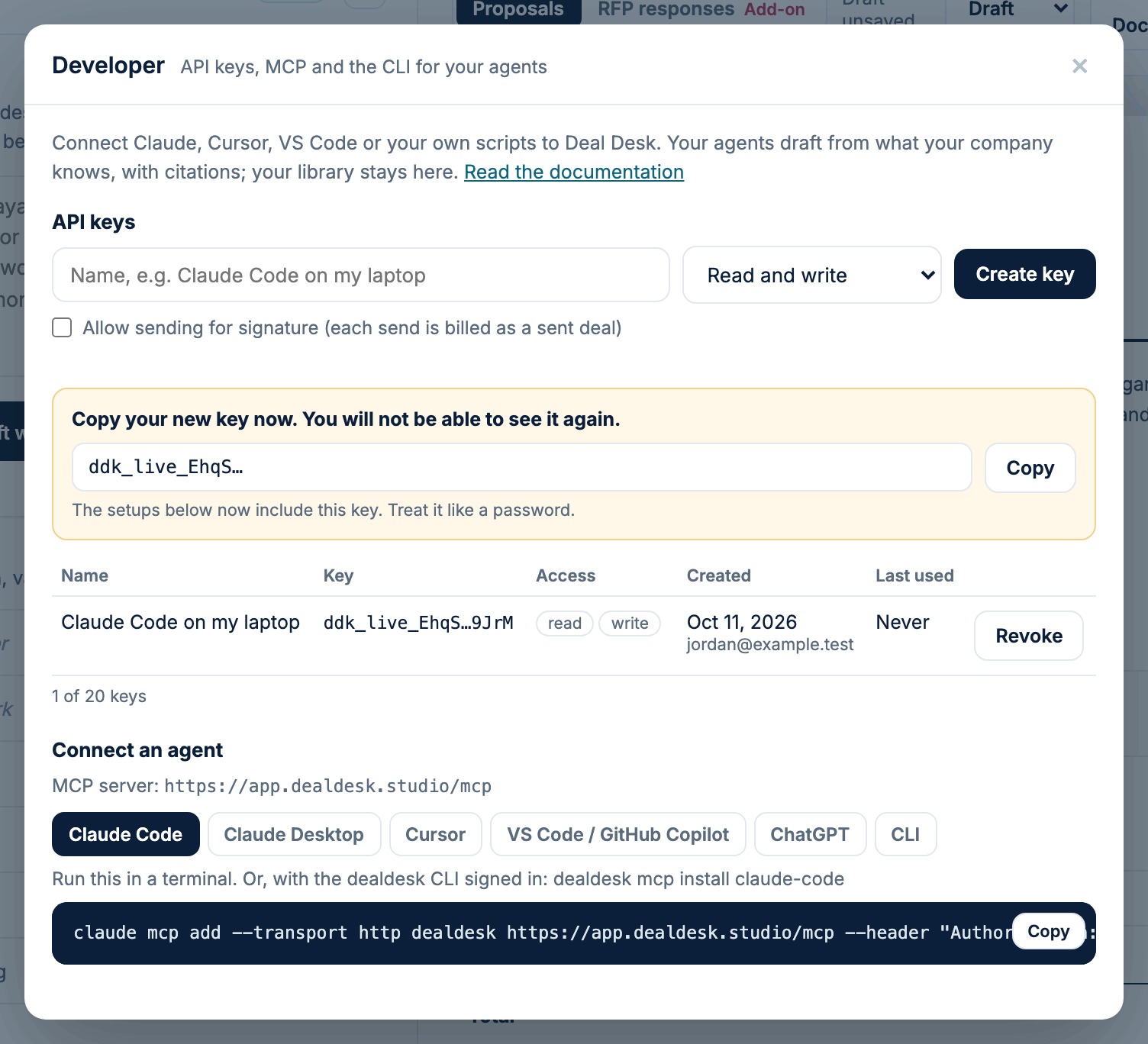
Treat a key like a password. Never put it in a shared document, an email or a code repository. If one is exposed, press Revoke next to it and create another.
2. Connect your agent
Under Connect an agent, Developer shows the setup for each client with your new key already filled in. Press Copy and use it as follows.
| Client | What to do |
|---|---|
| Claude Code | Run the command in a terminal. |
| Cursor | Add the lines to ~/.cursor/mcp.json. |
| VS Code / GitHub Copilot | Add the lines to .vscode/mcp.json, then use Copilot Chat in agent mode. |
| Claude Desktop | Add the lines to claude_desktop_config.json (Settings, Developer, Edit Config). |
| Your own agent | Use the REST API or the MCP server. |
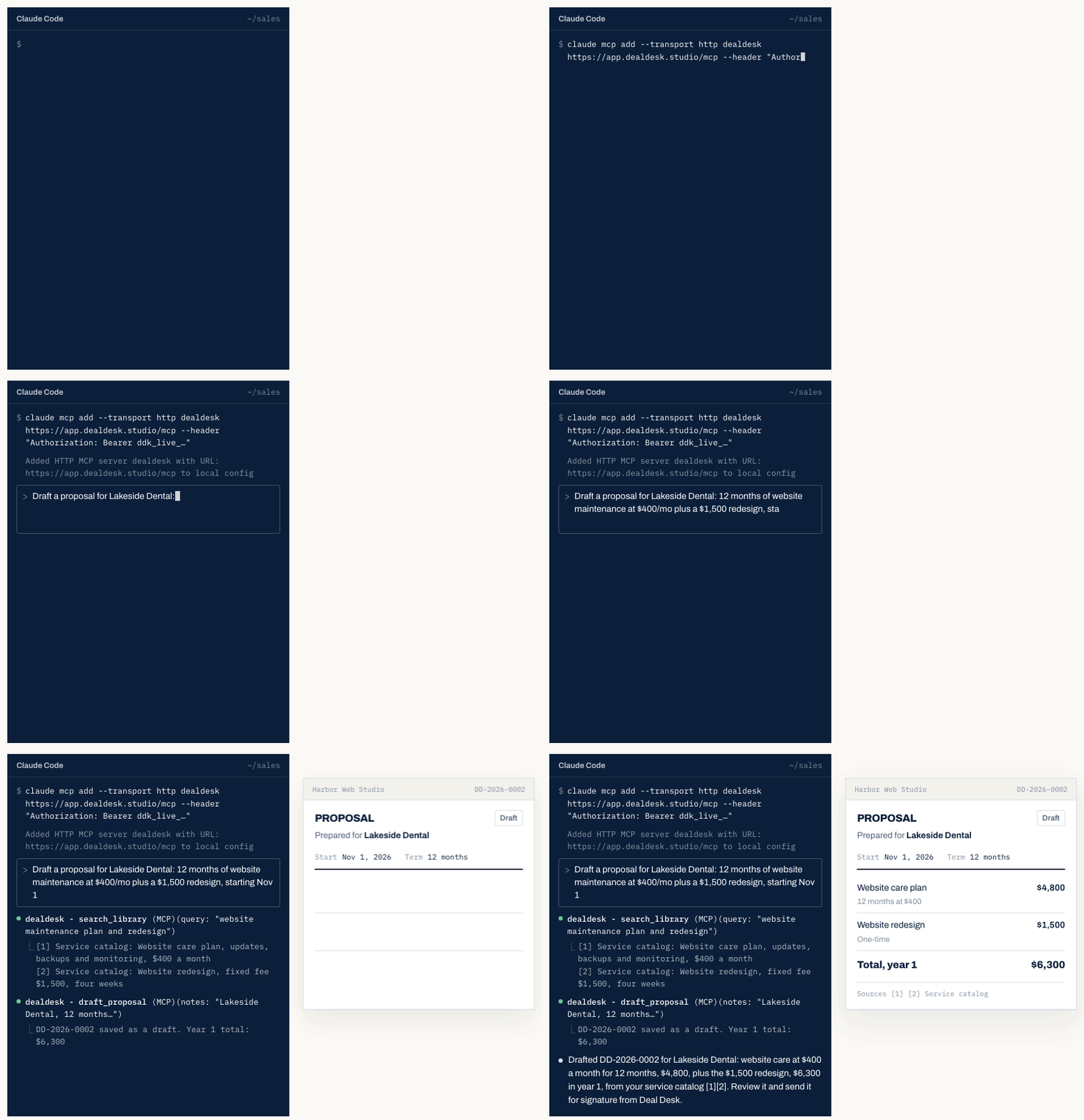
For Claude Code, the command looks like this, with your key at the end:
claude mcp add --transport http dealdesk https://app.dealdesk.studio/mcp --header "Authorization: Bearer ddk_live_..."
The ChatGPT app and the Connectors screens in claude.ai and Claude Desktop sign in with OAuth, which Deal Desk does not offer yet. They are coming soon.
3. Ask your agent
Ask in plain words. For example:
- "Draft a proposal for Lakeside Dental: 12 months of website maintenance at $400/mo plus a $1,500 redesign, starting Nov 1."
- "What do we know about our safety record?"
- "We have been ISO 9001 certified since 2021. Remember that."
- "Upload this RFP to Deal Desk and draft every answer."
The agent searches your library with search_library and cites what it uses. When you tell it a fact about your company, it saves it with teach_fact. A proposal it drafts with draft_proposal is saved in Deal Desk as a draft, where you review it, brand it and send it. Drafting never counts as a send.
If the library does not support a claim, the agent is told to ask you rather than guess. The more you put in What we know, the less it has to ask.
Keys and security
- Deal Desk keeps only a hash of each key. It cannot show a key again: if you lose one, revoke it and create another.
- A key stops working at once when it is revoked, when the person who created it stops being an admin, or when the account leaves the plans that include Developer.
- Make one key per agent or computer, so revoking one leaves the rest working.
- Your library stays in Deal Desk. The agent receives only the passages a question needs, as cited answers.
- You can use Deal Desk alongside a private memory tool such as Gnarl. The agent uses both, and each store stays separate.
The command line tool
The dealdesk command line tool does the same from a terminal. dealdesk login signs it in
through your browser, without pasting a key, and dealdesk mcp install claude-code connects
Claude Code for you. See the command line tool for how to set it up.
Developer docs
The full list of tools, the REST API, the OpenAPI document and the limits are in the developer docs.