Deal Desk for your AI agent.
Keep writing proposals in Claude, Cursor or Copilot. Connect Deal Desk once, and the agent drafts from what your company actually knows, with citations, while Deal Desk does the pricing, the document and the signature.
From $9 a month, your agent drafts from your company’s real library, with citations.

Fluent is not the same as right
An agent writes a convincing proposal in seconds. It does not know your references, your rates or your terms, and it does arithmetic in prose.
| The agent on its own | With Deal Desk connected | |
|---|---|---|
| Facts about your company | Whatever sounds right. A missing reference or certification gets made up. | From your library and the facts you taught it, each one cited. If the library does not know, the agent is told to ask you. |
| Prices and totals | Arithmetic written as prose, and sometimes wrong. | Line items, discounts and totals per year, computed by Deal Desk. |
| The document | Text in a chat window, to paste somewhere. | A proposal on your letterhead, saved in Deal Desk as a draft, with a PDF. |
| The signature | Not its job. | E-signature and a sealed PDF, sent when you say so. |
Set up in three steps
A few minutes, once. You need to be an account owner or admin.
Create a key in Developer
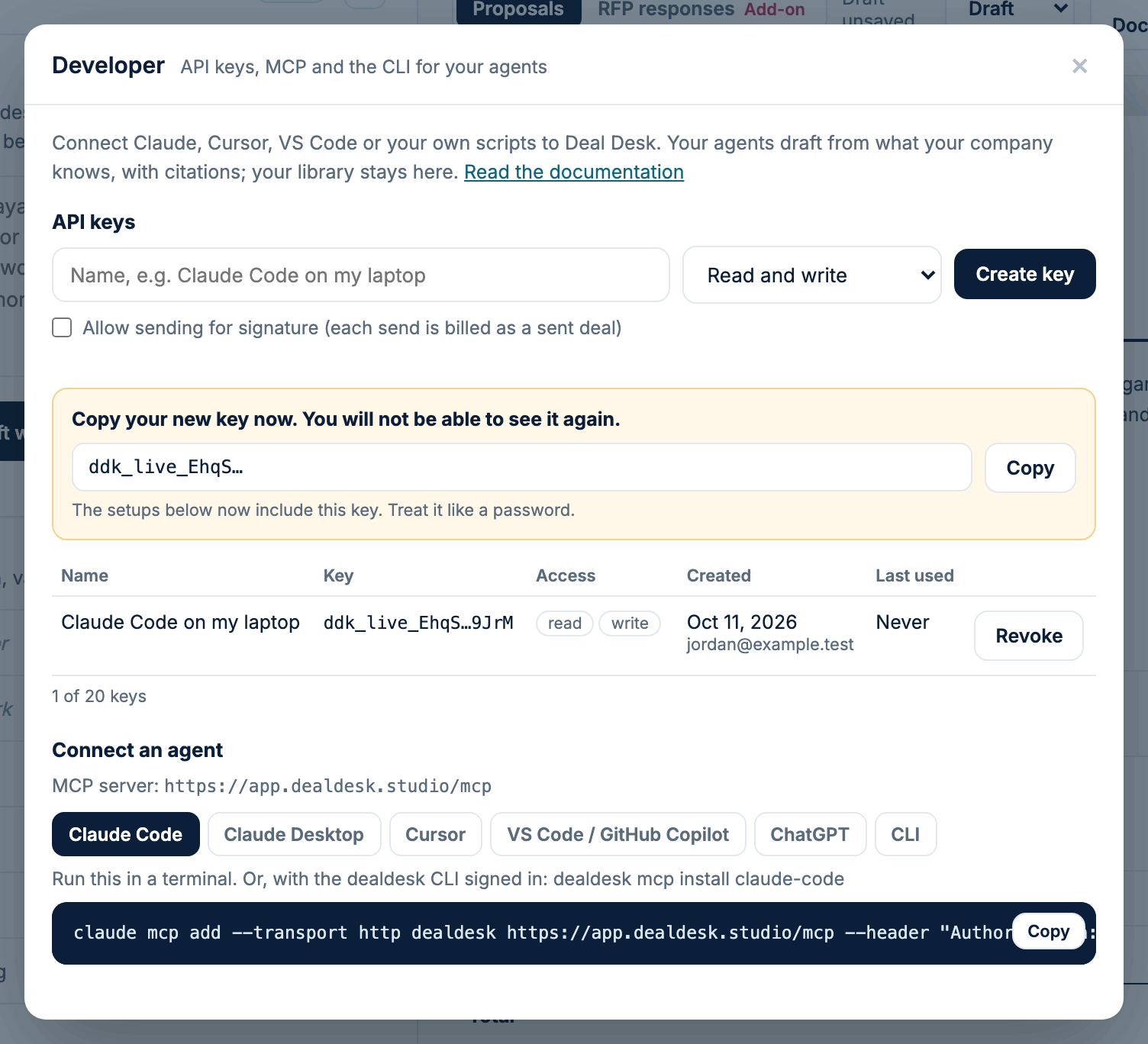
In Deal Desk, open the account menu and choose Developer. Name the key after where it will be used, choose what it may do, and press Create key. Copy it then: it is shown once.
Run the one command
For Claude Code it is one line. Developer shows it with your key already filled in, next to the setup for Cursor, VS Code and Claude Desktop.
claude mcp add --transport http dealdesk https://app.dealdesk.studio/mcp --header "Authorization: Bearer ddk_live_..."Prefer a terminal of your own? The dealdesk command line tool signs in through your browser with dealdesk login, without pasting a key. The developer docs explain how to set it up.
Ask your agent
“Draft a proposal from these call notes.” “What do we know about our safety record?” “Upload this RFP to Deal Desk and draft every answer.” The draft lands in Deal Desk, where you review it, brand it and send it.
Works in the tools you already use
Deal Desk is a remote MCP server at app.dealdesk.studio/mcp, with a REST API beside it. The ChatGPT app and the Connectors screens connect by signing in with Deal Desk.
| Client | How it connects | Today |
|---|---|---|
| ChatGPT | Add Deal Desk as a connector, then sign in with Deal Desk and approve. | Coming soon |
| Claude Code | One command in the terminal, with an API key. | Available |
| Claude Desktop | An entry in its configuration file, with an API key. | Available |
| Connectors in claude.ai and Claude Desktop | Add a custom connector with the Deal Desk address, then sign in with Deal Desk. | Coming soon |
| Cursor | A few lines in its MCP settings, with an API key. | Available |
| VS Code / GitHub Copilot | A few lines in .vscode/mcp.json, then Copilot Chat in agent mode. | Available |
| Any MCP-compatible agent | The remote MCP server, or the REST API for your own code, with an API key. | Available |
What the agent can ask Deal Desk for
Some of the tools a connected agent sees, and the permission each one needs.
The full list, the REST endpoints and the OpenAPI document are in the developer docs. Every tool, with its inputs
Security, in plain words
Price
Drafting through an agent is free, as it is in the app.
Let the agent write. Let Deal Desk get it right.
Create your account, choose Starter or above, and make your first key under Developer.